The drawers
Four top-level lists. Three of them share one rule: a row is one click to the console, pointed at that thing. Nothing expands into a folder tree, because the Explorer is thirty centimetres above and does that better.
The fourth, Registry, is the exception that proves it — a row there is not something you have, so clicking it acquires rather than opens.
Agents
Every agent project on the machine — from ~/.axon and from any axon.config.ts in your
workspace.
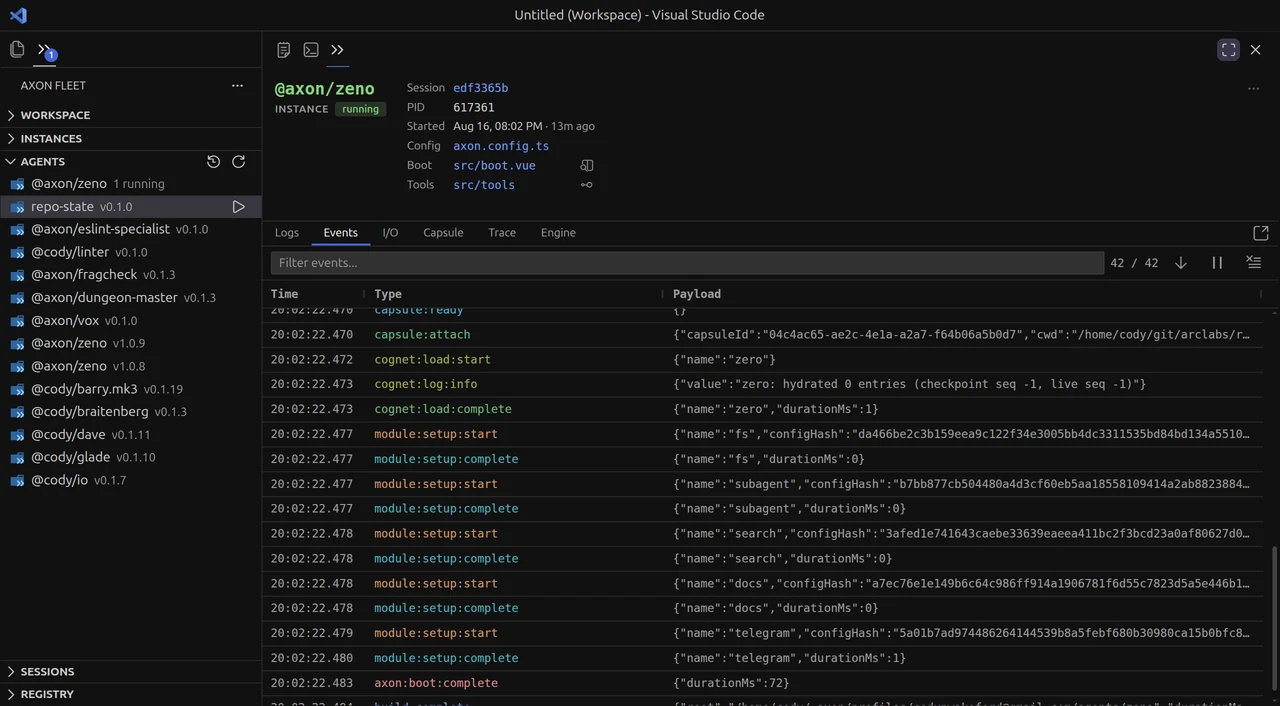
The row carries the registry identity and the version, or how many instances are running when any are. Hover and a ▶ starts a dev server without leaving the sidebar.
Several versions of one agent list separately, because they are separate projects on
disk — a published v1.0.9 and the v1.0.8 you still have checked out are two things you
can run.
Right-click for the rest: inspect it in the console, open its console, show what is installed.
Instances
Every agent process alive right now, whoever started it.
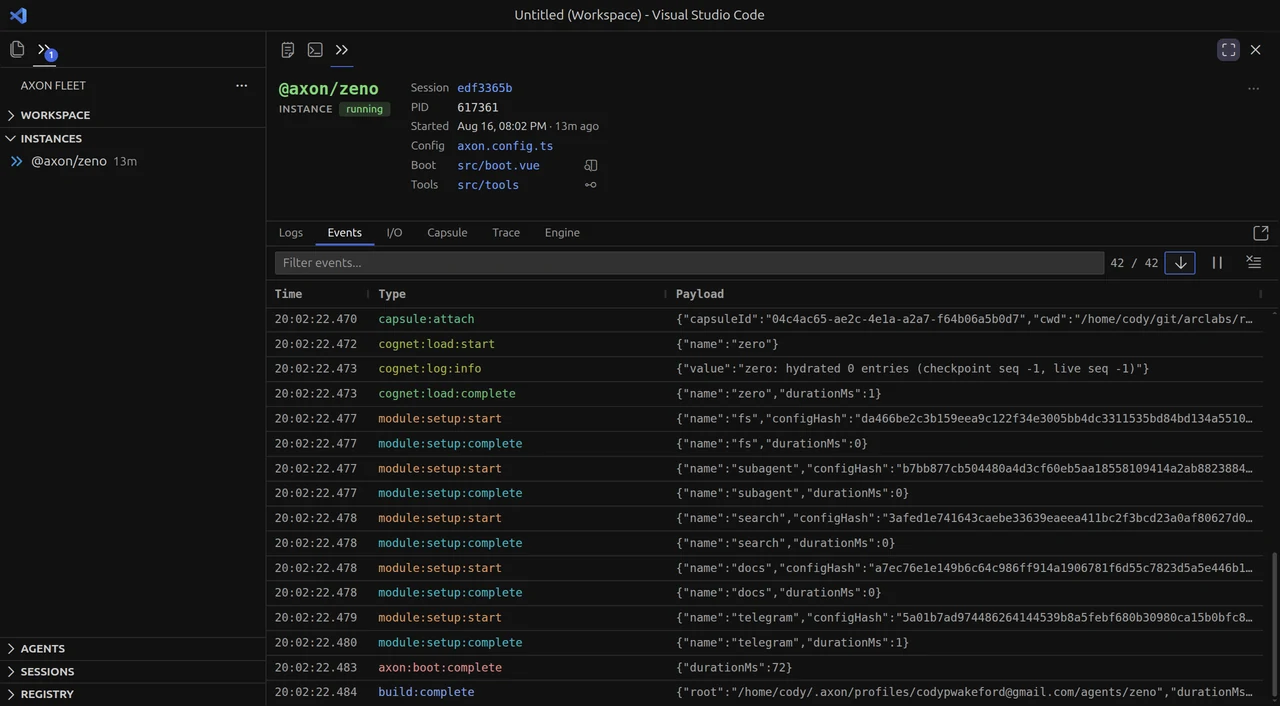
Selecting one puts its identity above the console: the session it is writing, its PID,
when it started, and links straight into the axon.config.ts, boot.vue and src/tools
it booted from.
The row leads with uptime rather than a pid — a pid is what you want once you are already debugging, but "how long has this been up" is what a list is scanned for, and it is what tells two runs of the same agent apart.
Subagents nest, and nothing else does. A subagent exists because its parent spawned it and its trace is part of that run — that is real containment. A repo is merely where a process happened to start, which is why the drawer is otherwise flat.
An instance whose parent has already exited stays at the top level rather than disappearing with it. A running process with nothing pointing at it is the one thing this list must never produce.
Right-click gives the panes directly — Events, Trace, Engine — plus Open in TUI and Stop.
Sessions
Every conversation on disk, searchable.
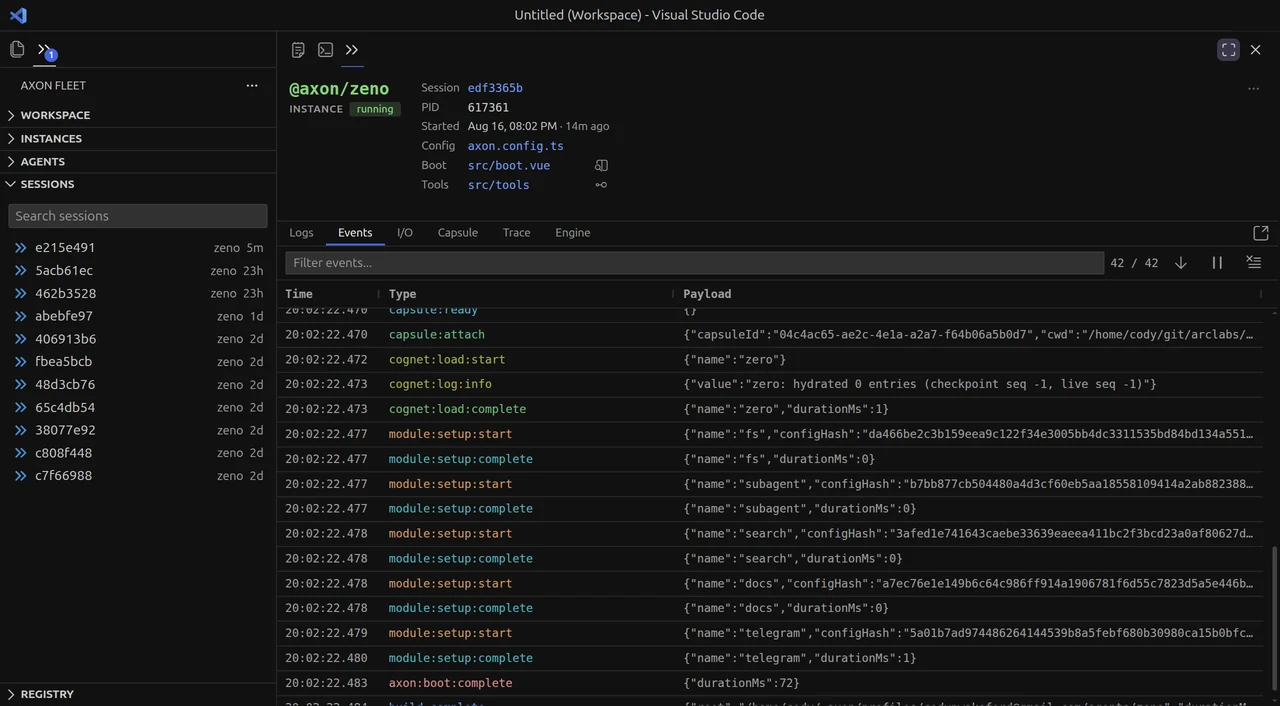
A row is the name you gave it, or its short id when you have not named one. Name a
conversation from the terminal with :session rename and it is findable here forever —
that is the same title, written into the session's own header, so the two surfaces can
never disagree about what a run is called.
Search matches the title, the agent and the id, and every term has to match — so
zeno auth narrows rather than widens.
There is no recency window. An earlier version capped this at 48 hours, which sounds tidy and fails exactly when it matters: the run you are hunting is usually the one that fell outside it. The whole archive lists, and the search box is what makes that usable.
Sessions still being written by a live instance show green. Clicking one opens the same console an instance opens — see live and finished.
Registry
The whole public catalogue, searchable, with acquisition on the row.

Search the registry, filter by kind with the pills, and take what you find without leaving the editor. The pills are a narrowing, so selecting none searches everything.
The action on the row depends on what the thing is, and the distinction is real rather than cosmetic:
| Agents, cognets, benches | Clone — a copy as editable source, in your agents directory |
| Modules, prompts | Install — into an agent that already exists |
| Extensions | Install — into the active profile |
An agent is not installed anywhere; you take a copy to read or change it. A module only exists installed into something. So a clone produces a new project and an install modifies one — which is why installing asks which agent, and cloning does not.
What an agent already has
Right-click an agent and Show Installed points this drawer at it: the same cards, listing what that agent declares rather than what the registry publishes. The action flips to uninstall.
That list is read from the agent's own package.json and axon.config.ts, never from a
catalogue query — so a privately published module, or one from a registry this machine is
not signed into, still appears. It comes back without a description, which is how you
notice something is unpublished rather than missing. A list of what is installed must
describe the agent, not the registry's opinion of it.
The filter is a search token (@installed:<path>), following the same convention as the
extension marketplace's @installed and @enabled. It is addressed by project root
rather than by name, because two checkouts of one agent share a name and have different
installs.
Next: The console — what opens when you click any of them.