The I/O timeline
Every feed the agent is reading from and writing to, on one clock. Not what it said — what it was receiving while it decided.
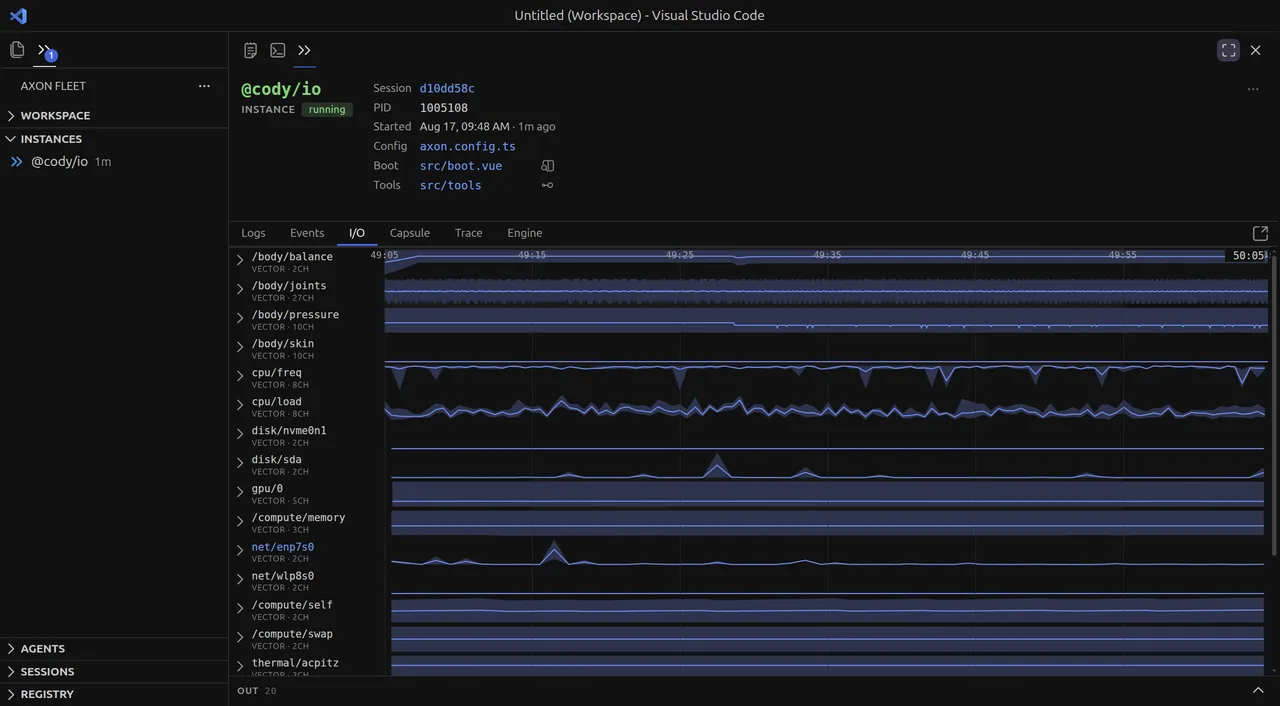
An Axon agent is not restricted to a chat box. It is a process with any number of channels attached — sensors in, actuators out — streaming continuously whether or not anyone is talking to it. This pane is those channels, side by side, over time.
Reading it
Channels run down the left. Each names its kind and its width: VECTOR · 27CH is
27 numbers arriving together, VIDEO is frames. To the right, each one draws itself
against a time axis shared by every row.
That shared axis is the whole point. A spike in /body/pressure and a jump in
thermal/coretemp are one event when they line up vertically, and a coincidence when they
don't — a question that is nearly unanswerable when each feed lives in its own log.
Rows fold. Collapsed, a vector channel is one summary band; expanded, it separates into its component channels. On an agent with forty feeds, folding is what makes the pane readable — open the two you suspect, leave the rest as texture.
OUT at the bottom is the same treatment for everything the agent emits. Inputs and outputs share the clock, so the delay between a stimulus arriving and the agent acting on it is a horizontal distance you can measure.
Video channels carry their frames
Hover any point on a video channel and the frame at that instant appears.
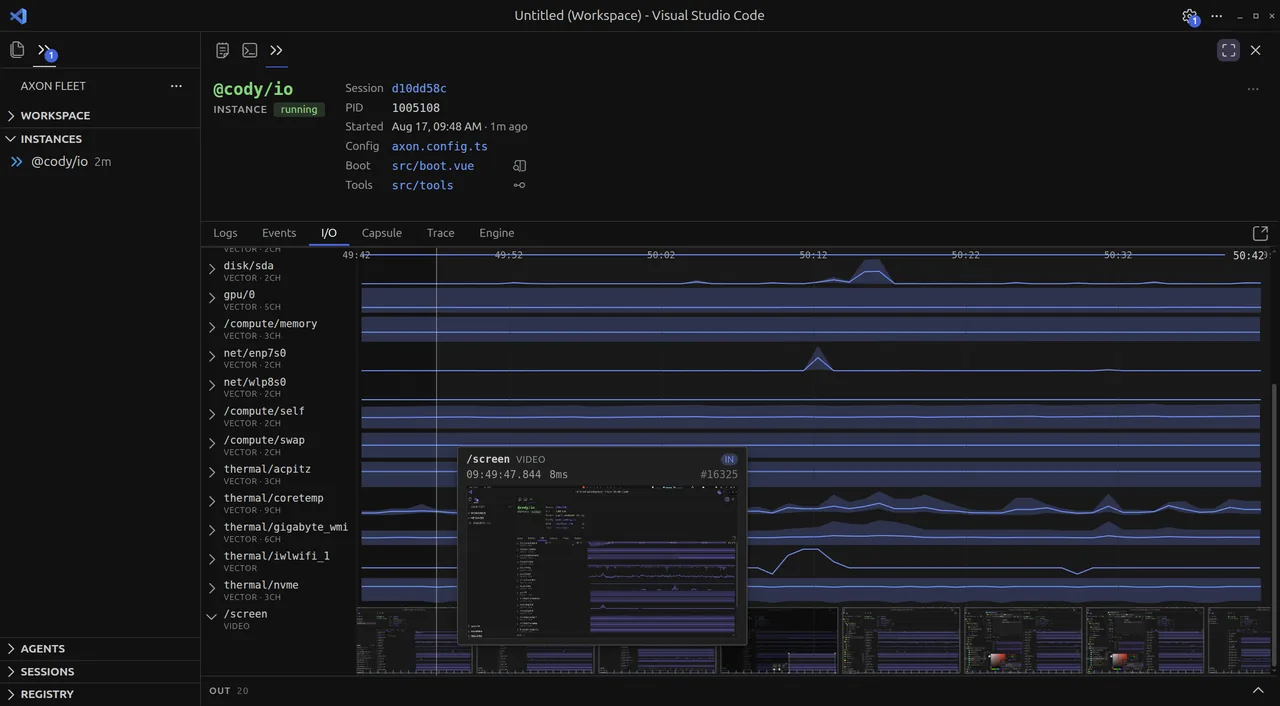
The tooltip names the channel, the direction (IN), the exact timestamp, how long the frame took, and its sequence number. The strip along the bottom is every other frame on that channel, so you can scrub the run visually.
This is the answer to what was it actually looking at? — asked at a specific millisecond rather than in general. A screen-sharing agent that did something inexplicable is usually an agent that received a frame you didn't expect, and this is where you see the frame rather than infer it.
Why this exists
The runtime was decoupled from the chat loop deliberately. Nothing in Axon assumes input is text, arrives in turns, or waits to be asked — a channel is a stream with a name, a kind, and a direction, and the cognet reads whatever is attached.
Once that is true, the console needs a view where a joint angle, a thermal reading and a video frame are the same kind of object on the same timeline. The event log records them faithfully but one per row, which is the wrong shape for asking whether two feeds moved together.
Channels are recorded like every other part of a run, so this pane works on a finished session exactly as it does live — and any agent with channels attached gets it without knowing the pane exists.
Where to see it
The screenshots are @cody/io, a small robot sim that streams sensor data through a cognet — the plainest demonstration of an agent taking many stimuli at once.
Two simulations are more fun to watch:
@cody/braitenberg — a vehicle with two light sensors and two wheels, steering toward the brighter side. No language model anywhere in it; the brain is arithmetic. The I/O pane shows sensors and wheels together, which is the entire organism.
@cody/glade — a creature trying to survive in a 2D grid world, with you playing the monster. Its channels are what it can perceive, so the timeline shows what it knew at the moment it ran.
Both are worth opening in the pane precisely because they are small: with four channels instead of forty, the relationship between what arrived and what the agent did is visible in a glance.
Back to the console — the other five panes.