Attaching
An agent running anywhere reachable over the network can be driven from your terminal. Local dev server, a container on another machine, a deployment — the same command, and the same interface once you are connected.
:attach http://localhost:3010
Attaching boots nothing. The agent is already up and owned by whoever started it, so
:close detaches and leaves it running — exactly as it does for a deployment.
Attach to a dev server
axon dev prints the URL it is listening on:
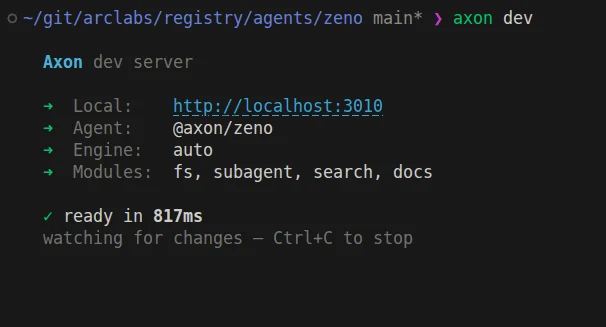
From another terminal, attach to it:
:attach http://localhost:3010
That is the whole loop for working on an agent while talking to it — the dev server hot-reloads on save, and your attached session keeps running against it.
What the handshake tells you
Attaching is not a blind socket open. The connection resolves the agent's identity, its loaded modules and tools, and its engine, then hydrates the session — so the conversation you see is the agent's real history, not an empty buffer.
That is why :attach takes a bare URL and still shows you a named agent: the handshake is
the only thing that knows what is running there. Everything the terminal does against a
local agent works the same way once attached — the palettes, session history, * to change
model, :open to inspect the trace.
Attaching to a deployment
Deployments are enumerable, so they are not typed. Press ~ and they appear alongside
your local agents — pick one and you are connected.
axon deploy prints the URL when it finishes, if you want to attach by address instead.
Use :attach when the address is something only you know: a dev server, a container you
started, an agent on another machine on your network. Use ~ when the platform already
knows about it.
One writer per session
Re-attaching to the same URL focuses the binding you already have rather than opening a second one. Two handles onto one remote session would both write to it, which breaks the one-session-one-writer rule that makes the log coherent.
The URL is normalised first, so a trailing slash or a capitalised host cannot slip past that guard. Paths are left case-sensitive, because folding them would merge two genuinely different agents behind one connection.
From the shell
The CLI has no attach yet — the terminal is the mature path here. What the CLI gives you
today is the HTTP and WebSocket surface directly, which is what you want from a script:
curl -X POST http://localhost:3010/api/chat \
  -H "Content-Type: application/json" \
  -d '{ "message": "summarise my open issues" }'
See Connecting for the full HTTP and WebSocket reference, including auth against a deployed agent.
Running it yourself
The base image reads an agent from a mount, so running one yourself needs no build:
docker run -v $PWD:/agent -p 8080:8080 axon/base:0.3.6
Expose its port and attach exactly as you would a dev server. The agent does not know the
difference — which is the point. See axon bundle for a
self-contained image when a mount is not available.
:attach http://10.0.0.42:3010
A local dev server needs no credential: it is already inside your own trust boundary. A deployed agent does — see Connecting.